
Discover how FXGlory's demo account works. Evaluate its functionality, trading tools, and suitability for beginners in this detailed 2026 review.
FXGlory Demo Account Overview
Creating and using an FXGlory demo account is a seamless and efficient process, easily done through the Client Cabinet. This demo account provides a risk-free environment where you can trade with virtual funds on live market price charts, closely mirroring real trading conditions without any financial exposure. To start, you'll need to create your demo account with FXGlory. Once created, you can dive right into the demo account, allowing you to practice strategies, learn the platform, and refine your trading skills at your own pace. Below, we’ve outlined the steps to help you get started and make the most of your demo trading experience. For a detailed tutorial on creating a real FXGlory Account, check out our How to Open an Account with FXGlory in 2026 page.
How to Create and Use an FXGlory Demo Account
Whether you’re a beginner looking to learn the ropes or an experienced trader testing new strategies, FXGlory offers a risk-free way to explore the world of forex trading. With virtual funds and real-time market conditions, you can practice trading, master platform features, and build confidence—all without risking your capital. Follow the steps below to create your demo account and start leveraging FXGlory’s powerful tools.
How to Create a Demo Account
Setting up a demo account with FXGlory is simple and should be done directly through your Client Cabinet. Follow these steps to start practicing on your preferred trading platform—MetaTrader 4 (MT4), MetaTrader 5 (MT5), or GloryTrader.
- Log in to your FXGlory Client Cabinet.
-
Locate and click the green "New Account" button.
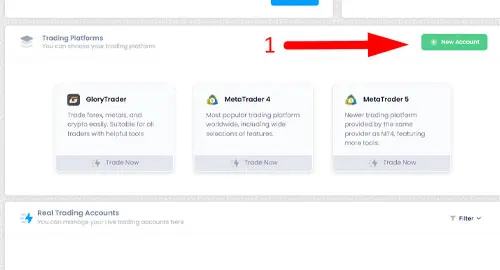
- Choose your preferred trading platform: MT4, MT5, or GloryTrader.
-
Select "Demo" when asked to choose between a live or demo account.
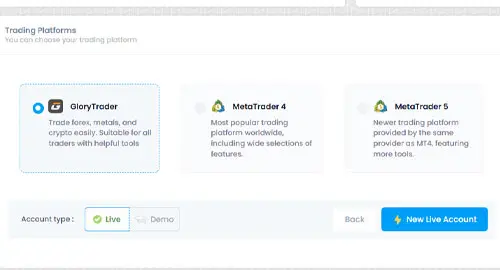
- Click on “New Demo Account.”
-
Customize your demo account by setting your password, initial balance, and leverage.
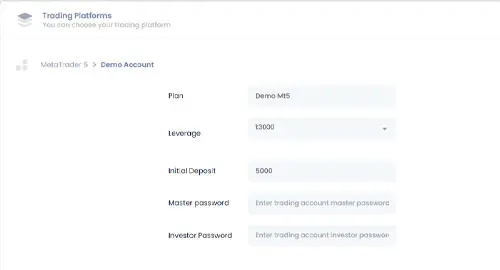
- Click "Finish" to complete the setup.
- Use these credentials to log in to the platform you selected and start practicing with virtual funds.
Remember that FXGlory Provides 24/7 Support service over different channels, so you can contact FXGlory Support if you face any issues or need any guidance to create your demo account.
Whether you're using MT4, MT5, or GloryTrader, this demo environment allows you to explore platform features and test trading strategies without depositing real money to FXGlory.
FAQs
1. What is an FXGlory Demo Account?
An FXGlory Demo Account allows traders to practice trading in a risk-free environment using virtual funds. It simulates real market conditions, allowing you to trade on live price charts and test different strategies without any financial exposure. Whether you're new to trading or an experienced trader, the demo account helps you familiarize yourself with the platform and build confidence.
2. How do I create an FXGlory Demo Account?
Creating a demo account with FXGlory is simple and quick. Just log in to your FXGlory Client Cabinet, click on the “New Account” button, choose your preferred trading platform (MT4, MT5, or GloryTrader), and select "Demo" for the account type. You can then set your desired leverage, initial balance, and password before clicking "Finish" to complete the setup. Afterward, use the credentials to log in and start trading with virtual funds.
3. Can I use the FXGlory Demo Account to learn the platform?
Yes! The FXGlory Demo Account is an excellent way to learn how to navigate the platform. It provides you with access to all the features and tools of your selected trading platform (MT4, MT5, or GloryTrader) without any financial risk. You can test various trading strategies, familiarize yourself with the interface, and understand the platform’s functionality—all while gaining valuable hands-on experience.
4. Is customer support available if I need help setting up my demo account?
Absolutely. FXGlory offers 24/7 customer support through multiple channels. If you encounter any issues or need assistance in setting up your demo account, you can contact the support team for guidance. Whether you’re experiencing technical difficulties or need help customizing your account settings, FXGlory’s support team is always ready to assist.
Published by:
 Jaxon Maddox