
Get the complete guide on opening a FXGlory account in 2026. Step-by-step instructions, account verification, and supported regions explained.
FXGlory Account Opening Requirements
FXGlory opening account process is designed to be accessible, yet it comes with specific registration requirements that every trader must fulfill. To begin FXGlory sign-up, you’ll need to provide personal details such as your full name, email address, phone number, and residential address. These details are foundational to meeting the FXGlory KYC requirements, ensuring compliance with global financial regulations.
FXGlory Supported and Prohibited Regions
FXGlory’s registration requirements are also influenced by your geographic location. The broker welcomes traders from a wide range of countries around the globe, ensuring its availability in regions where Forex trading is legally allowed. However, due to regulatory constraints, FXGlory does not permit account registrations from certain regions. This ensures that the broker remains compliant with international regulations while providing a secure trading environment for eligible traders.
FXGlory Account Types
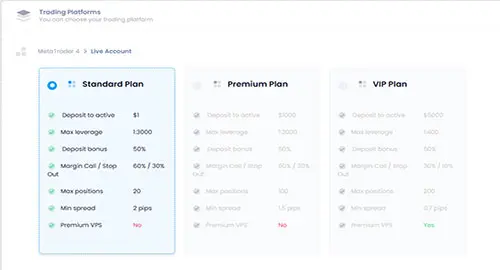
FXGlory offers a diverse range of account types designed to cater to the varying needs of traders at all levels. Whether you're a beginner or an experienced trader, FXGlory ensures that there’s an account type suited to your preferences. During the account opening process, you can select from options such as the Standard Account, which is ideal for newcomers with lower trading volume; the Premium Account, offering enhanced features and better trading conditions for more experienced traders; and the VIP Account, which offers exclusive benefits and advanced trading conditions for professional traders seeking a higher level of trading experience. Each account type comes with its own set of benefits, making it easier for traders to select the one that aligns with their trading style and objectives.
Account Opening Steps
Opening an account with FXGlory is a quick and straightforward process, designed to be completed in just a few minutes. The user-friendly registration process ensures that traders can begin trading without unnecessary delays. Whether you're a beginner or an experienced trader, FXGlory streamlines the process, making it as efficient and hassle-free as possible.
Step 1: Visit the Official FXGlory Website
Start your FXGlory account creation journey by navigating to the official FXGlory website using your preferred browser. Locate the “Sign Up” under the "Client Cabinet" button on the homepage and click it to begin the sign-up process.
Step 2: Fill Out the Registration Form
You’ll be directed to a registration form where you must enter your personal details as part of the FXGlory registration requirements. Provide your full name, email address, phone number, country of residence, date of birth, and residential address. These details are essential for FXGlory verification and compliance with FXGlory KYC requirements.
Step 3: Confirm your email address
You will receive a confirmation email in your registered email address. Locate the email and confirm it by clicking on a provided link in the email that you receive. This will establish your FXGlory Client Cabinet.
Step 4: Choose Your Account Type
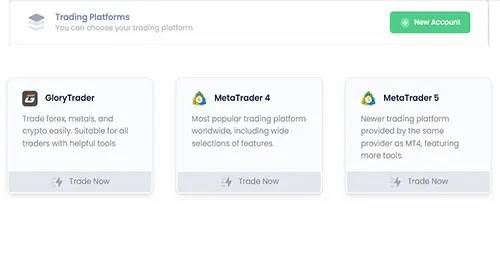
Once you Client Cabinet is made, you can log in to that and locate “New Account” key and choose the platform you wish. Each Platform has different features and is tailored for different clients.
Select your preferred account type—Standard, Premium, or VIP—based on your trading needs. Each account type also has specific minimum deposit levels (e.g., $1 for Standard and $1000 for Premium).
Step 6: Set Your Passwords
Select your preferred leverage, and if you're opening an MT4 or MT5 account, create both the master and investor passwords. If you'd like to receive a bonus, make sure to enable it. Once done, click 'Finish' and you're all set to go.
Your trading account has now been successfully created, and you're ready to begin your trading journey. With your account set up, you can start exploring the platform, deposit funds, and begin executing trades. Enjoy the seamless trading experience that FXGlory offers, and make the most of the tools and features available to enhance your trading strategy.
How to Close Your FXGlory Account
Closing your FXGlory account is a straightforward process, but it requires careful steps to ensure compliance with FXGlory registration requirements and security protocols. Follow this guide to terminate your account properly.
Step 1: Withdraw All Funds
Before initiating the closure of your FXGlory open account, ensure all funds are withdrawn. Log into your Client Cabinet, navigate to the "Withdrawal" section, and transfer your balance to your preferred payment method.
Step 2: Access Account Settings
Log into your Client Cabinet using your FXGlory sign-up credentials. From the "Account" dropdown menu at the top, select "Settings" to access the account management options.
Step 3: Locate the Termination Option
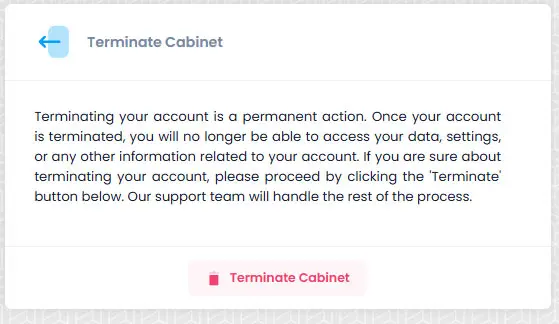
Scroll down the "Settings" page until you find the "Terminate Cabinet" section. This area contains the controls needed to close your FXGlory open account permanently.
Step 4: Submit Termination Request
Within the "Terminate Cabinet" section, locate the "Terminate Cabinet" button or key. Click it to send your termination request to FXGlory. This action formally notifies the broker of your intent to end your account.
Step 5: Await Confirmation
After submitting, FXGlory will process your request, typically within a 24 hours. You’ll receive a confirmation email once your account is terminated. If delays occur, contact support.
FAQ
How do I open an account with FXGlory?
Visit the FXGlory website, sign up, and then you can create your account through your Client Cabinet by selecting your preferred platform and account type.
What is the minimum deposit to open an FXGlory account?
The minimum deposit is $1 for a Standard account, making it accessible for beginners.
Is FXGlory safe to open an account with?
FXGlory is a regulated forex broker, authorized and overseen by IFSA, ensuring a secure and compliant trading environment for its clients.
What account types does FXGlory offer?
FXGlory offers Standard (1:3000 leverage, $1 minimum), Premium (higher deposits, better spreads), and VIP accounts (advanced features for large traders).
How long does it take to open an FXGlory account?
Account opening is typically instant after registration, and takes only a few minutes.
How do I close my FXGlory account?
Log into your Client Cabinet, submit an account closure request, and await for the response.
Published by:
 Jaxon Maddox